
Mootion Lifetime Deal Review: My Honest Experience
You want to make videos fast. AI video tools promise a lot. Can they really deliver? I looked into Mootion. It says it can make a full video story from one prompt. That sounds pretty good. So, I tried it myself to see. This review shares what I found. I'll tell you if the Mootion lifetime deal is a smart move for you. Let’s get into it.
This review comes from my own hands-on testing. I make content for a living. I am always looking for new tools. My goal is to find things that save time and work well. This is my honest opinion on Mootion.
Mootion Review – What Is It?
Mootion is an AI video creation tool. You give it a simple instruction. It makes a whole video for you. The AI plans the story. It finds images and adds a voice. It even adds music.
You do not need any video editing skills. The idea is to make video creation easy for everyone. It helps people share their stories online.

👉 TL;DR
Mootion creates full videos from a single prompt.
The AI handles the script, visuals, and voiceover.
You can edit the story before making the video.
It offers different styles, like cartoon or cinematic.
The lifetime deal on AppSumo is a one-time cost.
This tool makes video production much quicker.
👉 Best For
Content Creators: Make shorts for YouTube or TikTok.
Marketers: Create simple ads and social media posts.
Educators: Build fun, visual lessons for students.
Small Business Owners: Promote products without a big budget.
It’s great for anyone needing videos without the hassle.
👉 Alternative to
Synthesia: A tool for creating AI avatar videos.
Pictory: Turns long text like blog posts into videos.
InVideo: A template-based online video editor.
Mootion focuses more on AI-generated stories from scratch.
How This Tool Creates a Video Story
I wanted to see how it works. So I decided to make a video. My test was based on a viral video style. It was a cute story about a turtle.
Starting With a Simple Prompt
I started on the Mootion dashboard. It was very clean and simple. I chose to create a faceless short video. I typed in my idea.
My prompt was: "Create a wholesome story about a turtle. It gets into a small accident. A rabbit finds the turtle and helps. They become good friends."
I also chose a few settings. I wanted the video to be vertical. This is perfect for YouTube Shorts. I selected the "cartoon" visual style. Then, I clicked the generate button. The process was very quick.
Reviewing the AI-Generated Story
In less than a minute, Mootion made a storyboard. It created 32 different scenes. Each scene had a picture and some text. The characters looked consistent. The turtle and rabbit appeared in the story.
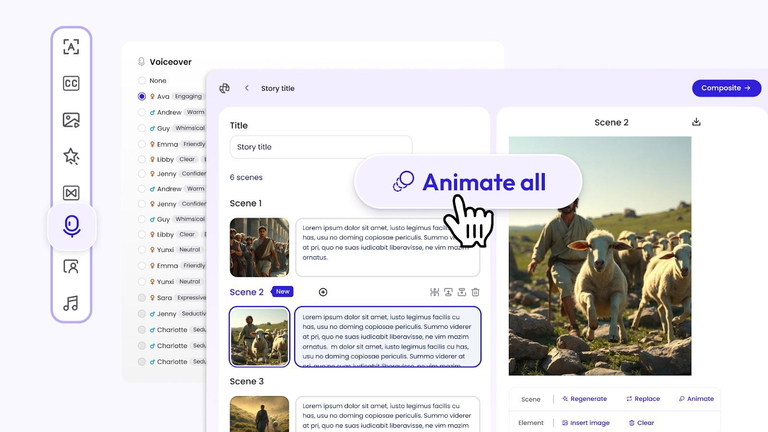
This storyboard is your first draft. You can change anything you want here. You can edit the text for each scene. You can ask the AI to make a new image. You can even delete scenes you don't like. For my first try, I changed nothing. I wanted to see the pure AI output.
Adding the Final Touches
Next, I moved to the final step. Here, you add subtitles, music, and a voice. I picked a subtitle style I liked. I chose a female narrator's voice. There were many voice options available. I also picked some background music.
I clicked the final button to put it all together. The video was ready in about two minutes. It was a full one-minute story. It was amazing to see an idea turn into a video so fast. This whole process was easy to follow.
Mootion Appsumo Lifetime Deal Plans & Pricing
AppSumo has a special offer for Mootion. You pay once and use it forever. This is different from a monthly plan. There are three levels for this deal.
License Tier 1 - $69
1,750 credits per month.
16 scenes per video project.
12 GB of asset storage.
Good for starting out.
License Tier 2 - $129
3,500 credits per month.
32 scenes per video project.
25 GB of asset storage.
Limited voiceover options.
License Tier 3 - $249
8,000 credits per month.
32 scenes per video project.
115 GB of asset storage.
Unlimited voiceovers.
All tiers create videos in 1080p. They are all free of watermarks. Choosing a tier depends on your video needs.

👉 Overview - Mootion
Mootion is designed for speed and simplicity. The company wants to make storytelling available to all. They saw that video creation can be hard. It often needs costly tools and a lot of time. Mootion uses AI to fix that problem.
The platform can take many types of input. You can use a prompt, text, or even an audio file. It turns your input into a polished video. It is a good tool for marketing, education, and social media. The AI automates almost everything for you. This lets you focus on the story idea itself.
Create polished video content for any use case in minutes—no editing skills required
Put your ideas in “Mootion”
Auto-generate a complete video story from a single prompt—no extra steps required
Let the AI plan everything, from structure and pacing to visuals and narration,
Monitor your creative process as a visualized logic flow, so you know what’s happening in real time
Make videos from existing content
Turn text, scripts, images, audio files, and images into high-quality videos
Save time by repurposing existing content
Create engaging videos from multiple sources without breaking a sweat
Whip up videos for any use case
Choose from templates for education, social content making, marketing, storytelling, and more to instantly shape your video
Focus on your ideas while Mootion handles the design
Level up your videos with animations
Create dynamic, professionally animated content without any complex editing tools
Generate characters, movements, and transitions with one prompt
Leverage the advanced video generation model to post content that stands out on feeds

👉 Mootion Lifetime Deals Review ($69) – Features
The lifetime deal offers many great features.
AI Story Creation: It builds a full story from one prompt.
Multi-Modal Input: Use text, audio, files, or links.
AI Avatars: Add a talking person to your videos.
Video Animation: Bring still images to life with motion.
Smart Templates: Get started quickly with pre-made layouts.
Watermark-Free: Your videos will look professional.
Commercial Use: You can use the videos for your business.
Multiple Languages: Create videos in over 15 languages.
These features provide a lot of creative freedom.
👉 Mootion Appsumo Lifetime Deal – Benefits
Why get the lifetime deal? There are some clear benefits.
Save Money: You pay once instead of every month. This saves a lot over time.
Future Updates: You get all future updates to your plan. The tool will keep getting better.
Generous Credits: The monthly credits let you make many videos.
No Risk: AppSumo has a 60-day money-back guarantee. You can try it without worry.
This deal offers great value for creators.

How It Works for Me
I did not stop with the turtle video. I wanted to test other features. I tried making a biography video about Steve Jobs. This time, I used a horizontal format. I also chose a "cinematic" look.
The AI created a great seven-scene story. It covered his life from start to finish. The images were very fitting. It even generated a picture of an iPhone. I also tested the AI avatar feature. I added an avatar to narrate the story. The lip-sync was quite good. This shows the tool is flexible. It can make different kinds of content.
What I Like & What Could Be Better
Every tool has its good and bad sides. Here is my honest take on Mootion.
What I Like
It is incredibly fast. I went from idea to video in five minutes.
The interface is very simple. Anyone can use it right away.
Character consistency is good. The turtle looked the same in every scene.
The animation feature is a nice touch. It makes the videos more dynamic.
What Could Be Better
The AI can make mistakes. In my first video, it made two turtle friends. My prompt asked for a rabbit friend.
Image generation can be hit-or-miss. When I asked for a "Steve Jobs birth" image, it failed.
Some animations are very subtle. You barely notice the movement.
No AI tool is perfect. But Mootion gets a lot right.
Comparison Table
| Feature | Mootion | Pictory | InVideo |
|---|---|---|---|
| Best For | AI story generation | Text-to-video | Template-based editing |
| Ease of Use | Very Easy | Easy | Moderate |
| AI Features | Story, Avatar, Animation | AI voice, Scene selection | AI script, Templates |
| Input Type | Prompt, Text, Audio | Script, Article, Video | Templates, Media files |
| Pricing Model | Lifetime Deal / Sub | Subscription | Subscription |
Mootion vs The Competition
How does Mootion compare to others? Let’s look at a few options.
Mootion vs Pictory
A Quick Look: Pictory is great for turning blog posts into videos. You give it a link, and it works. Mootion is better for creating new stories from an idea.
Key Difference: Pictory repurposes existing content. Mootion creates original content. Your choice depends on your starting point.
Mootion vs InVideo
A Quick Look: InVideo offers thousands of video templates. You pick one and customize it. It gives you more manual control over the look.
Key Difference: InVideo is a template-based editor. Mootion is an AI storyteller. Mootion is faster if you want the AI to do most of the work.
Mootion vs Synthesia
A Quick Look: Synthesia is a leader in realistic AI avatars. It is used for corporate training and presentations. It feels very professional.
Key Difference: Synthesia focuses on high-quality avatars. Mootion offers avatars as one of many features. Mootion is more for general storytelling.
Mootion vs HeyGen
A Quick Look: HeyGen is another strong player in the AI avatar space. It also offers features like video translation and face swapping.
Key Difference: HeyGen has more advanced avatar features. Mootion has a stronger focus on generating the entire story arc automatically.
Mootion vs Descript
A Quick Look: Descript is an amazing tool for editing audio and video. It works like a text document. It is loved by podcasters.
Key Difference: Descript is an editor first. Mootion is a generator first. You would use Descript to edit a video, not create its story.

My Personal Experience
Honestly, I had a good time using Mootion. It feels like a creative partner. The process of giving a prompt and seeing a story appear is fun. I was impressed with the speed. The quality of the cartoon videos was quite high.
It's not a tool I would use for a high-end client project. But for creating social media content quickly, it's fantastic. The ability to make videos with or without a voiceover is a big plus. It lets you test what works best for your audience. It made the creative process feel light and easy.
Recommendation
I recommend the Mootion lifetime deal. It's a solid tool for the price. It is perfect for people who want to make a lot of content. If you are a YouTuber, a marketer, or a teacher, you will find it useful. It lowers the barrier to video creation.
You do not need to be a tech expert. You just need to have ideas. The tool handles the hard parts. For a one-time payment, it provides lasting value. It’s a smart way to add video to your strategy.
Pros And Cons Based On Real-world Usage
Pros
Very User-Friendly: The platform is simple to learn.
Fast Video Generation: Creates videos in just minutes.
Cost-Effective Deal: The lifetime offer is great value.
Good for Shorts: Vertical format and short stories are perfect for socials.
No Watermarks: Videos look clean and professional.
Cons
AI Can Misinterpret: Sometimes it gets details in the prompt wrong.
Limited Fine-Tuning: You have less manual control than a traditional editor.
Credit System: You need to watch your credit usage for animations.
Who Should Consider The Mootion Lifetime Deal
You should think about this deal if you are:
A solo creator on a budget.
A marketer needing quick social videos.
A business owner wanting to make simple promo content.
An educator looking for engaging teaching tools.
Anyone curious about AI video creation.
It's a low-risk way to explore powerful AI technology.
User Feedback And Performance Insights
| User | Review |
|---|---|
| CreatorMax | "I started a new channel with Mootion. The videos are easy to make. I can post daily without burnout. It's a great tool for shorts." |
| MarketingPro | "We use Mootion for simple product ads on Instagram. The process is fast. It saves our team a lot of time compared to other software." |
| Teacher_Tom | "My students love the animated stories I make with Mootion. It makes learning history fun. I am not a tech person, but I can use this." |
Is This Lifetime Deal a Smart Investment?
Yes, I believe it is a smart investment. Monthly subscriptions for video tools can be costly. They add up over the year. A lifetime deal is a one-time expense. You get a capable tool that will grow with you.
The world is moving towards more video content. Having a tool like Mootion is a big advantage. It lets you produce content consistently. Consistency is key to growing an audience. For the price, the value you get is very high.
My Final Thoughts
Mootion is a strong and simple AI video creator. It makes storytelling with video accessible to everyone. It is not perfect, but its speed is a huge benefit. The AppSumo lifetime deal makes it a very attractive offer.
If you want to make videos without the long editing process, give it a try. It might just be the tool you need to get your stories out there. The potential for creating engaging content is huge.
FAQ
Is Mootion free to use?
Yes, Mootion has a free plan. It gives you 40 credits to start. Paid plans offer more credits and features.
What kind of videos can I create?
You can make many types of videos. People create stories for kids, educational content, marketing videos, and biographies. It works for many topics.
Can I download the videos I make?
Yes, you can download your videos. You can also download the script and images. This is useful for editing in other software.
What languages does Mootion support?
Mootion supports many languages. These include English, Spanish, French, German, and Japanese. They are always adding more new languages.
Should I buy the Mootion lifetime deal?
The deal is good if you make videos often. It saves money compared to a monthly plan. It is a smart choice for long-term use.
About the Author: Why I Care About This
I'm a content creator and tech enthusiast. I spend my days exploring tools that make our lives easier. My goal is to find practical solutions that help people communicate better. I believe AI can empower creators in amazing new ways. I share my honest findings to help you make informed decisions. This is not just a job; it is my passion.















This is a Software & Digital Product Reviews website. we focus on giving advice about online marketing and giving honest reviews of digital tools. Our goal is to give businesses and people the information they need to make smart choices in the digital world.
Stay informed with valuable tips delivered straight to your inbox.